The Misuro B + is a speed sensor that is able to send speed / cadence / power data via the ANT + and Bluetooth Smart protocols.
The data that the sensor is able to send varies depending on the trainer on which it is applied and for which it is configured. In some cases, the data are not available by the physical nature of the trainer.
In the case of multi-level trainer, the sensor is not able to determine the position of the lever, so the power value can't be sent.
- In case of trainers with Elastogel roller, the sensor is set near the red roller, and it reads the magnet rotation.
- In case of Direct-Drive trainers, the Misuro can be set in different positions, so depending on where it has been set it can send all three values (speed, cadence, power) or only speed and power.
The protocols of the device with which the sensor connects, must be ANT + or Bluetooth Smart, followed by a brief guide:
Check device compatibility (tablet / smartphone) with ANT + or Bluetooth Smart
Misuro B+ can be used with many Elite home trainers so it must be properly set depending on the model you are using.
The inside of the Misuro B+ looks like this:
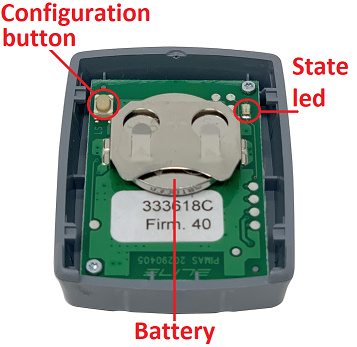
The CONFIGURATION BUTTON is used to select the proper settings for the home trainer to use.
After the configuration, the STATUS LED light indicates which home trainer has been set based on the number of blinks.
The number of blinks of the LED light must be set depending on which home trainer you want to connect the Misuro B+ sensor to (set the proper number of blinks based on the table indicated in the manual):
By tapping once on the configuration button, the LED light indicates the previously set home trainer based on the number of blinks (for instance, if the Power Fluid configuration was set it will blink 5 times) and each subsequent tapping of the button will increase the number of blinks by one (for instance, if it blinks five times, by tapping once it will start blinking 6 times)
Warning:
The old wheel-on Elite home trainers may not always be compatible with the Misuro B+.
To check out if your home trainer is compatible please follow the instructions in this short video: